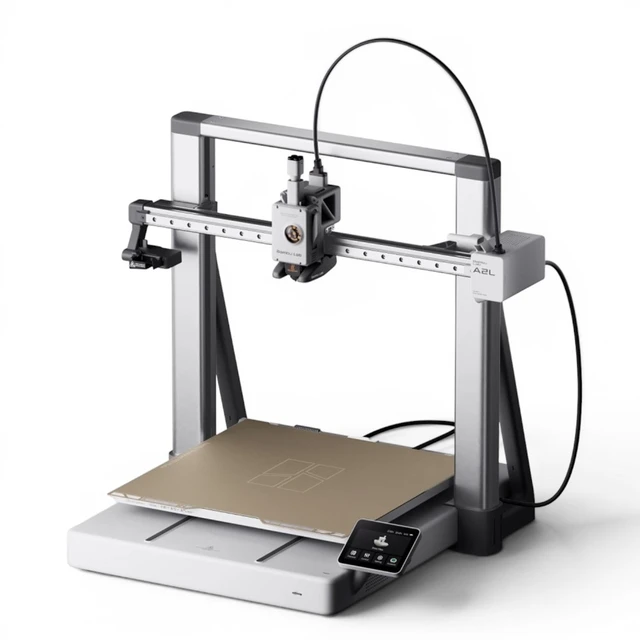
Unboxing & Assembly: More Hands-On Than You’re Used To
Unlike the A1 mini or any CoreXY Bambu, the A2L does not come out of the box ready to print. It arrives in pieces — and you need to assemble it yourself. The included English manual walks you through every step, but expect to spend some time turning screws.
Assembly flow:
- Mount the heated bed (note: it ships unsecured, which is unusual for Bambu)
- Attach the gantry base to the frame and lock down the screws
- Apply the included grease to the Y-axis rails — this is a rare user-side lubrication step you won’t find on most other printers
- Assemble the AMS lite (which also arrives disassembled in the combo)
Of all Bambu’s current lineup, this is the most assembly-heavy machine. If you’ve gotten comfortable with the “open the box, plug it in, print” experience of recent Bambu printers, this will feel like a throwback. But the payoff is the build volume.
AMS Lite Top-Mount & Box-Type AMS Support
The AMS lite can be converted from side-mount to top-mount, which saves desk space. More importantly, the A2L has a dedicated top-mount bracket for box-type AMS units (AMS or AMS 2 Pro), which you can stack on top of the AMS lite as well. The maximum configuration:
- 1 × AMS lite
- 3 × AMS 2 Pro
- 1 × AMS HT
That’s up to 19 colors on an A-series machine. No AMS Hub needed — the box-type AMS connects directly.
New Blob Detection Sensor
At the X-axis end, the purge wiper now includes a flap sensor that detects filament buildup around the nozzle. A small but welcome hardware addition.
Initial Setup & Calibration: 40 Minutes, Hands Off
Once assembled, the software side is classic Bambu — smooth and automated. After setting language, Wi-Fi, and your Bambu account, the printer runs through:
- Motor noise cancellation
- Vibration compensation
- Automatic bed leveling
About 40 minutes, fully automatic. The 3.5-inch touchscreen is the same hardware and software as the A1 — familiar territory.
Three Big Leaps Over the A1 Series
1. Massive Build Volume — Batch Production & Big Single Prints
| Model | Build Plate (mm) | Area vs A1 mini |
|---|---|---|
| A1 mini | 180×180 | 1× (baseline) |
| A1 | 256×256 | ~2× |
| A2L | 330×320 | ~4× |
Real-world example: a knit-chicken model that normally prints one at a time was laid out as a full-bed batch — 429g of filament, ~1.5 days, all done in a single run. Another test: a 3D terrain map of an entire Tokyo city block, generated from geographic data, printed in one piece.
2. 325 mm Z-Height — No More Splitting Prints
The A1 tops out at 256 mm in Z, which means tall props get cut in half, glued, and filled. The A2L’s 325 mm Z-height lets you print those models in one shot. A basketball-hoop model with long vertical posts that previously required joining multiple segments printed as a single clean piece. No alignment, no glue lines, no weak joints.
3. AMS Flexibility — Up to 19 Colors, No Hub Required
Unlike the A1, the A2L accepts box-type AMS units directly without an AMS Hub adapter. This alone makes it the most AMS-flexible A-series machine Bambu has ever made.
Print Quality: Great — With an Asterisk
3DBenchy: The Shake Test
First Benchy at full speed revealed something dramatic: the entire table was shaking with the printer. The bed-slinger’s Y-axis motion at 330 mm scale generates serious momentum. Noise exceeded 55 dB, and the AMS lite on the side was visibly rocking.
Print result: mild ringing (ghosting) on the bow and cabin frame. Bambu’s vibration compensation can only do so much when the desk itself is moving. Bambu’s official Wiki calls this “normal.” The workaround: put it on the floor — or a very solid, heavy table. Even on the floor, the printer still shifted slightly, and print quality was about the same.
FDMtest & Non-Benchy Prints
At normal speeds (not the all-out Benchymark pace), the A2L delivers:
- Vertical ringing test lines — no visible ghosting
- Bridging — almost zero sag
- Overhangs — on par with the P2S and X2D, genuinely impressive for a bed-slinger
Full-bed First Layer
Because the first layer runs slower for adhesion, there’s no table-shake issue. First-layer quality was solid and even across the entire 330 mm plate.
Tall Prints & Ringing
Where the bed-slinger architecture shows its limits: tall, large prints get visible ringing on the upper sections. A PLA vase and a tall structural bracket both showed ghosting artifacts near the top at high speed. Slowing down helps, but the fundamental problem is physics — a 330 mm bed moving back and forth at speed creates vibrations that even adaptive compensation can’t fully eliminate.
Bottom line: The A2L prints beautifully for most models, but if you need flawless surface quality on tall, large parts, a CoreXY machine like the H2D is the honest answer.
Three Things You Need to Know Before Buying
1. Assembly & Placement Are Real Hurdles
This is Bambu’s most assembly-intensive printer. Top-mount AMS configurations add extra work. And the vibration problem isn’t a minor nuisance — it dictates where you can put the machine. A wobbly desk is a non-starter. The accessories kit includes grippy silicone feet alongside the standard foam pads, and you’ll want to use them.
2. Ringing on Tall, Large Prints
Adaptive vibration compensation and dual granular dampers help, but a bed-slinger this large at high speed will always have limits. If surface perfection on tall models is a dealbreaker, consider stepping up to the CoreXY line.
3. Long Prints Need a Box-Type AMS
The AMS lite keeps filament exposed to ambient air. During a ~1.5-day helmet print, the filament jammed mid-run — likely due to moisture absorption. A TPU bottle print using an external spool holder jammed after about a day as well (TPU is especially moisture-sensitive). The PMSM closed-loop extruder did catch the anomaly and paused the print — so the sensor suite does its job — but a sealed box-type AMS with desiccant is the real fix for multi-day prints.
Buying strategy: Instead of the A2L Combo ($569 with AMS lite), consider buying the A2L standalone ($469) and pairing it with a separately purchased AMS 2 Pro ($299). You get a sealed, drying-capable AMS and skip the open-air AMS lite limitations. Plus, bed-slingers don’t love constant filament-switch vibration anyway — the box AMS is a better match for long prints and occasional multi-material.
Price & Value
Official US store prices (August 2026):
| Configuration | Price (USD) | Includes |
|---|---|---|
| A2L Standalone | $469 | Printer + textured PEI plate |
| A2L Combo | $569 | Printer + AMS lite |
| A2L + AMS 2 Pro (separate) | $768 | Printer + sealed drying AMS |
For context, the previous cheapest way to get a 300+ mm Bambu was the H2S at $1,249. The A2L delivers the same build-volume class at under $500. If you print PLA/PETG and want big parts, the value is absurd.
Verdict
The A2L is the right printer for the right person. If you print PLA or PETG, mostly single-color, at large scale — cosplay props, home decor, batch production — this is the cheapest ticket into 330 mm-class Bambu printing. The build area is real, the print quality (on non-tall parts) holds up to the P2S and X2D, and the AMS flexibility is unmatched in the A-series.
If you want heavy multicolor, or surface perfection on tall engineering prints, CoreXY is still the move. But for the person who’s been waiting for a big Bambu at an A-series price? This is the one.