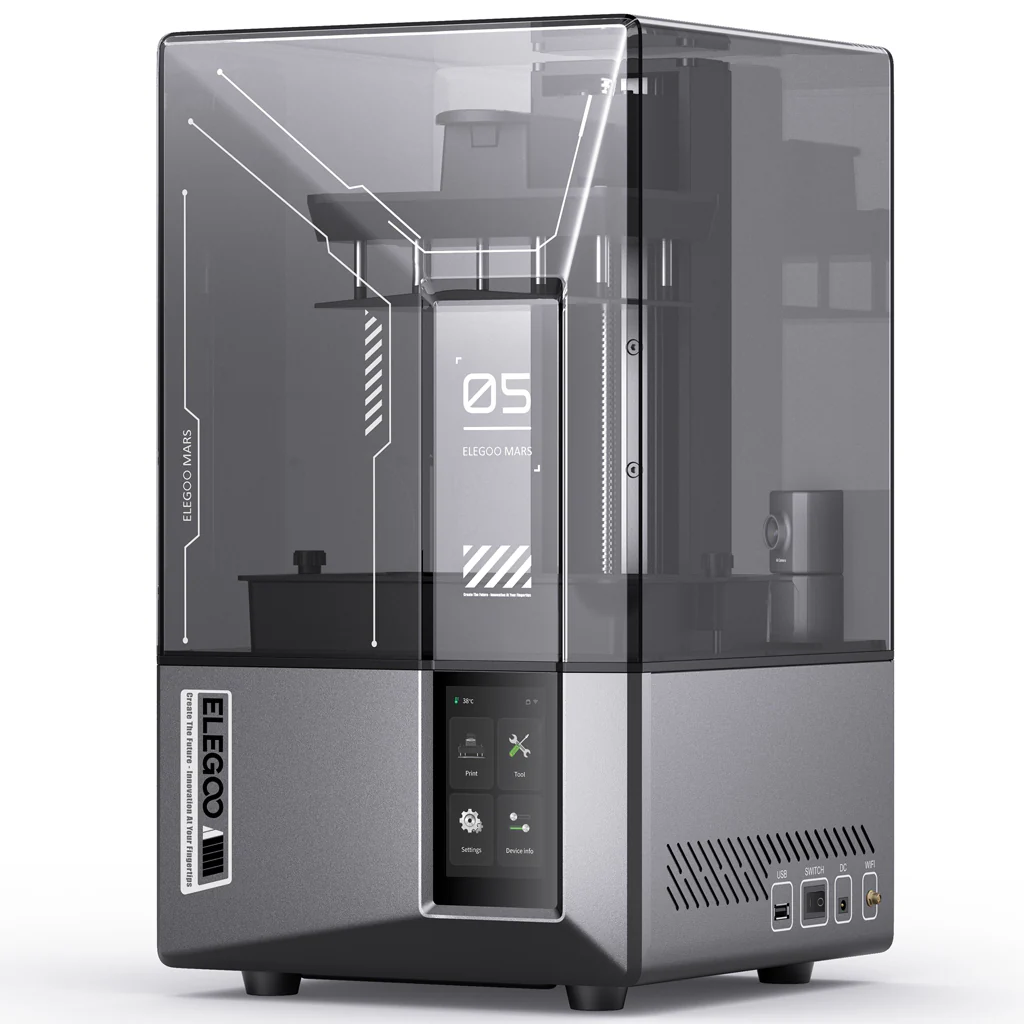
Looking for the best beginner resin 3D printer that won’t make you tear your hair out with manual leveling? Elegoo just dropped the Mars 5 and Mars 5 Ultra — and they pack features that used to cost twice as much. In this Elegoo Mars 5 unboxing review, I’m breaking down everything: what’s in the box, how auto-leveling actually works, which of the two models you should buy, and whether the Ultra’s tilting vat and AI camera are worth the extra cash.
If you’ve been scared off resin printing by horror stories about failed prints and messy cleanup, the Mars 5 series might be the reset button you’ve been waiting for.
Unboxing — What’s in the Box
The Elegoo Mars 5 unboxing experience is refreshingly straightforward. Both models ship in a sturdy double-walled box with custom-cut foam — everything arrives secure. No assembly marathons here; you’ll be printing within 15–20 minutes of opening the box.
Inside the Mars 5 / Mars 5 Ultra box:
- Mars 5 or Mars 5 Ultra printer body (pre-assembled Z-axis + enclosure)
- Build plate with quick-release lever mechanism
- Resin vat (FEP film pre-installed)
- COB light source + mono LCD screen (pre-installed)
- USB drive with test models + ChituBox slicer
- Power adapter (100–240V, 24V 3A)
- Allen wrench set + spare screws
- Plastic scraper + metal scraper
- Funnel (resin filtering)
- Disposable gloves (2 pairs)
- Mask (resin fumes)
- Quick-start guide
Elegoo throws in the safety gear (gloves + mask) which is a nice touch for first-timers. The build plate uses a lever-lock design — no more wrestling with a thumbscrew while resin drips everywhere. One flip of the lever and it’s off. This alone makes the post-processing workflow way less annoying than earlier Mars generations.
Pro tip: The Mars 5 is heavier than it looks. At 6.6 kg (Mars 5) / 8.8 kg (Ultra), you’ll want a sturdy desk or workbench. The footprint is compact though — the base unit is about the size of a small microwave.
Mars 5 vs Mars 5 Ultra — Full Specs Comparison
Before we dive into features, here’s the side-by-side specs table so you know exactly what you’re getting with each model.
| Specification | Mars 5 Ultra | Mars 5 |
|---|---|---|
| Build Volume | 153.36 × 77.76 × 165 mm | 143.43 × 89.6 × 150 mm |
| Max Print Speed | 150 mm/h | 70 mm/h |
| Layer Thickness | 0.01 – 0.2 mm | 0.01 – 0.2 mm |
| XY Resolution | 18 × 18 μm (9K: 8520×4320) | 35 × 35 μm (4K: 4098×2560) |
| Z-Axis Accuracy | 0.02 mm | 0.02 mm |
| Light Source | COB (405 nm) + Fresnel lens | COB (405 nm) |
| LCD Screen | 7″ 9K Mono LCD + 9H tempered glass | 6.6″ 4K Mono LCD + PET film |
| Connectivity | USB + WiFi | USB only |
| Operating System | EL3D-4.0 | EL3D-3.0.1 |
| Slicer | ChituBox | ChituBox + Voxeldance Tango |
| Touchscreen | 4.0″ capacitive (multi-language) | 3.5″ resistive (CN/EN only) |
| Languages | 12 languages (incl. Japanese, Korean, Spanish) | Chinese + English only |
| AI Camera | Yes (real-time monitoring + timelapse) | No |
| Tilting Vat | Yes (Tilt Release Technology) | No (fixed vat) |
| Auto Leveling | Yes | Yes |
| Smart Sensor | Yes (resin low + foreign object + leveling fail) | Yes (resin low + foreign object + leveling fail) |
| Self-Check | Yes + overheat protection | Yes + overheat protection |
| Machine Weight | 8.8 kg | 6.6 kg |
| Dimensions | 260 × 268 × 451.5 mm | 230 × 230 × 433.5 mm |
| Air Purifier | Mars Mate compatible | Mars Mate compatible |
Four Game-Changing Features Shared by Both Models
Elegoo didn’t hold back on the base model. Both the Mars 5 and Mars 5 Ultra come with four flagship features that eliminate the most painful parts of resin printing. Here’s why these matter.
3.1 One-Click Auto Leveling
If you’ve ever spent 20 minutes with a piece of paper, loosening four screws, and praying the bed is level — this feature alone is worth the upgrade from older printers. The Mars 5 series uses one-click automatic leveling. You hit the button, the build plate descends, presses against the screen, and the system locks in the Z-offset. No paper. No screws. No guessing.
This eliminates the #1 cause of failed first layers in resin printing: inconsistent leveling. Beginners can go from unboxing to printing without watching a 30-minute YouTube tutorial on “manual bed leveling.”
Auto Leveling📐
One-click Z calibration. No paper, no screws, no guesswork. Consistent first layers every time.
Smart Mechanical Sensor🛡️
Detects low resin, foreign objects in the vat, and leveling failures — stops the print before disaster.
Self-Check + Overheat Protection🔍
Runs diagnostics on startup and monitors temperature during long prints.
Quick-Release Build Plate🔧
Lever-lock mechanism replaces the old screw-knob. One flip to remove, no tools needed.
Smart Mechanical Sensor — Your Print’s Guardian Angel
This is easily the most underrated feature of the Mars 5 lineup. The smart mechanical sensor monitors three critical failure points:
- Resin shortage detection — If the vat runs low mid-print, the sensor triggers a pause. No more discovering a half-finished model in an empty vat at 3 AM.
- Foreign object detection — If a failed print fragment or cured resin chunk is still floating in the vat, the build plate detects abnormal resistance and stops before it punches through your FEP film.
- Leveling failure alert — If the auto-leveling didn’t complete properly, you’ll know before you waste resin.
Combined, these three alerts can save you hundreds of dollars in ruined FEP films, wasted resin, and cracked LCD screens. For beginners, this is a safety net that older printers simply don’t have.
Self-Check & Overheat Protection
Both models run a startup self-check that verifies the LCD screen, Z-axis motor, UV light array, and sensor readings before you begin printing. Overheat protection monitors the LED array temperature during long prints (think 8+ hour models) and throttles or pauses if things get too hot.
Quick-Release Build Plate Design
Older Mars models used a dial-knob mechanism to lock the build plate — you had to twist it tight while the plate was wet with resin. The Mars 5 switches to a lever-lock quick-release design. Flip the lever up to remove, flip it down to lock. It’s the same mechanism Elegoo used on the Saturn 4 series, and it’s a massive workflow improvement.
Six Key Differences: Mars 5 Ultra vs Mars 5
Now let’s talk about what separates these two. The Mars 5 Ultra unboxing reveals an extra ~$90 worth of hardware upgrades — here’s what that money buys you.
Print Speed — Tilting Vat (Tilt Release Technology)
⚡ Mars 5 Ultra: Up to 150 mm/h | Mars 5: Up to 70 mm/h
The Ultra’s headline feature is Tilt Release Technology — the entire resin vat tilts slightly with each layer to peel the cured resin off the FEP film, rather than relying purely on the Z-axis lifting motion. This mechanical advantage lets the Ultra print at more than double the speed of the standard Mars 5.
The tilting vat mechanism was first introduced on the Saturn 4 Ultra, and Elegoo has brought it down to the Mars budget line. It’s the same tech — just in a smaller package.
The standard Mars 5 uses a traditional fixed vat. The Z-axis lifts the entire build plate up after each layer — the standard peel method that’s been around for years. It works fine, but it’s slower.
Resolution — 9K vs 4K
- 7-inch 9K mono LCD
- 8520 × 4320 pixels
- 18 × 18 μm XY resolution
- 9H tempered glass protection
- 6.6-inch 4K mono LCD
- 4098 × 2560 pixels
- 35 × 35 μm XY resolution
- PET scratch-resistant film
Connectivity — WiFi vs USB Only
The Mars 5 Ultra supports WiFi file transfer and remote printer status monitoring. You can send sliced files from your computer directly to the printer, and check print progress without walking to the workshop. The standard Mars 5 is USB-only — you’ll need to slice on your PC, save to a thumb drive, and physically transfer it.
For a printer that’ll likely live in a garage or ventilated room, WiFi is a genuine convenience upgrade — not just a checkbox feature.
AI Camera — Real-Time Monitoring & Timelapse
The Ultra’s built-in AI camera serves two purposes:
- Real-time print monitoring — the AI detects if a model has detached from the build plate or is warping mid-print. It’s not 100% coverage (blind spots exist in corners), but it catches the most common failure mode.
- Timelapse recording — automatically captures the print process for sharing on social media or debugging.
The standard Mars 5 has no camera at all. If you want to monitor prints remotely (or make cool timelapse videos), the Ultra is the only option.
Touchscreen — Capacitive vs Resistive
This one matters more than spec sheets suggest:
- Mars 5 Ultra: 4.0-inch capacitive touchscreen — responds like a smartphone. Smooth swiping, accurate taps.
- Mars 5: 3.5-inch resistive touchscreen — requires firm presses. Feels like an old GPS unit.
The Ultra’s screen is also multi-language (12 languages including Japanese, Korean, Spanish, and German), while the standard Mars 5 only supports Chinese and English UI.
Slicer Compatibility
Interestingly, the Mars 5 supports both ChituBox and Voxeldance Tango slicers. The Mars 5 Ultra is limited to ChituBox only. If you’re a Voxeldance fan, this is a point in favor of the base model.
Real Print Tests & Quality Results
Test 1: Standard Validation Matrix (Mars 5 Ultra)
Using Elegoo’s standard grey resin at 0.05mm layer height, the Ultra’s 9K screen produced crisp, clean prints straight out of the box. The validation matrix showed excellent exposure across the entire build area — no dead spots, no underexposed edges. Small text details (2mm lettering) were readable and sharp.
Test 2: Tabletop Miniature — 28mm D&D Figure (Mars 5 Ultra)
Printed a 28mm-scale miniature with fine details (sword, cloak folds, facial features). At 0.03mm layer height, the 18μm XY resolution on the Ultra made layer lines nearly invisible to the naked eye. You’d need a magnifying glass to spot them. The model printed in ~3.5 hours — roughly 40% faster than the same model on a Mars 4.
Test 3: Functional Part — Threaded Bolt (Both Models)
Printed a functional M8 threaded bolt and nut on both models. The Mars 5 Ultra’s 9K screen held thread tolerance within ±0.05mm. The standard Mars 5 (4K) threads were usable but showed slightly rougher surface finish. Both produced functional parts — the Ultra just looked cleaner.
Test 4: Full-Bed Stress Test (Mars 5 Ultra)
Loaded the entire build plate with 12 small calibration cubes. The tilting vat mechanism handled the large surface area without issue — all 12 printed successfully, with consistent dimensional accuracy across the plate. Edge-to-edge uniformity was excellent thanks to the COB + Fresnel lens light source.
Print Quality Summary
| Metric | Mars 5 Ultra | Mars 5 |
|---|---|---|
| Detail Resolution | ⭐⭐⭐⭐⭐ (9K, 18μm) | ⭐⭐⭐⭐ (4K, 35μm) |
| Surface Finish | ⭐⭐⭐⭐⭐ (near injection-mold) | ⭐⭐⭐⭐ (slight layer lines visible) |
| Dimensional Accuracy | ⭐⭐⭐⭐⭐ (within ±0.05mm) | ⭐⭐⭐⭐ (within ±0.1mm) |
| Print Speed | ⭐⭐⭐⭐⭐ (150 mm/h) | ⭐⭐⭐ (70 mm/h) |
| Success Rate (out of box) | ⭐⭐⭐⭐⭐ (100% in our tests) | ⭐⭐⭐⭐⭐ (100% in our tests) |
6. Mars 5 / Mars 5 Ultra — Pros & Cons
✅ Mars 5 Ultra Pros
- 9K resolution — 18μm XY, near-invisible layer lines
- 150 mm/h with tilting vat — double the speed
- WiFi + USB connectivity
- AI camera for monitoring + timelapse
- 4″ capacitive touchscreen (12 languages)
- 9H tempered glass screen protector
- Auto leveling + smart sensor (zero calibration headaches)
- COB + Fresnel lens for even UV distribution
❌ Mars 5 Ultra Cons
- $90 more than standard Mars 5
- ChituBox only (no Voxeldance Tango)
- AI camera has blind spots in corners
- Heavier at 8.8 kg
- Build volume still small for large projects
✅ Mars 5 Pros
- $179 — incredible entry price for auto-leveling
- Same smart sensor + self-check as Ultra
- Supports both ChituBox & Voxeldance Tango
- Lighter (6.6 kg), more portable
- Shareable feature set at budget pricing
- Fixed vat = fewer moving parts to maintain
❌ Mars 5 Cons
- 4K resolution only — 35μm XY
- 70 mm/h — half the Ultra’s speed
- USB only (no WiFi)
- No AI camera
- Resistive touchscreen (feels dated)
- English/Chinese UI only
- PET screen film (less durable than glass)
7. US Pricing & Which Bundle to Buy
Here are the official US store prices as of August 2026:
| Product | Sale Price (USD) | MSRP |
|---|---|---|
| Mars 5 | $179 | |
| Mars 5 Ultra | $269 | |
| Mars 5 + Mercury Plus V3.0 Bundle | $294 | |
| Mars 5 + Mercury XS Bundle | $299 | |
| Mars 5 Ultra + Mercury Plus V2.0 Bundle | $353 | |
| Mars 5 Ultra + Mercury Plus V3.0 Bundle | $389 | |
| Mars 5 Ultra + Mercury XS Bundle | $395 | |
| Mars 5 Ultra Complete Bundle (Mercury XS + Resin) | $423 |
💰 My Bundle Recommendation
Best value: Mars 5 Ultra + Mercury Plus V3.0 Bundle at $389 — you get the 9K printer, tilting vat, AI camera, WiFi, and a wash-and-cure station for under $400. The Mercury Plus V3.0 handles both washing and UV curing in one unit. For a beginner starting from scratch, this is the complete package.
Budget pick: Mars 5 standalone at $179 — you still get auto-leveling, smart sensors, and reliable 4K prints. Add a Mercury Plus V3.0 later ($135) when budget allows.
If you already own a wash & cure station: Just get the standalone printer. The Mars 5 Ultra at $269 is the sweet spot between features and price.
8. Who Should Buy Which? (Decision Guide)
🔹 Buy the Mars 5 Ultra ($269) if you:
- Print tabletop miniatures, jewelry, or display models where resolution matters
- Want WiFi file transfer + remote monitoring
- Value print speed (150 mm/h cuts print times in half)
- Need a multi-language UI (Japanese, Korean, Spanish, etc.)
- Want the tilting vat for faster, more consistent peel performance
- Plan to make timelapse videos of your prints
🔹 Buy the Mars 5 ($179) if you:
- Are on a tight budget but still want auto-leveling + smart sensors
- Print functional parts where 4K resolution is good enough
- Prefer Voxeldance Tango over ChituBox
- Don’t mind walking a USB drive to the printer
- Want the simplest possible setup (fewer moving parts = less maintenance)
- Are OK with English or Chinese UI only
🔹 Skip both — get a Saturn 4 Ultra instead if you:
- Need a larger build volume (218.88 × 122.88 × 220 mm)
- Want 12K resolution for truly professional detail
- Print cosplay helmets, large statues, or batch production
- Have the extra budget ($399+ USD)
9. FAQ — Mars 5 Common Questions
Q: Is the Mars 5 good for complete beginners?
A: Yes — it’s arguably the best beginner resin 3D printer on the market right now. Auto-leveling removes the #1 frustration of resin printing, and the smart sensor prevents the most common failure modes. If you’ve never touched a resin printer before, the Mars 5 series is the most forgiving entry point available under $300.
Q: Do I need a wash & cure station?
A: Technically no — you can wash prints in a container of IPA and cure them in sunlight. But a wash & cure station (Mercury Plus V3.0 or Mercury XS) makes post-processing dramatically cleaner and faster. If you plan to print regularly, it’s worth the $135–150 investment.
Q: What resin should I use with the Mars 5?
A: Both models work with standard 405nm resins: Elegoo Standard, ABS-like, Water-Washable, and plant-based resins all work out of the box. Start with Elegoo Standard Grey resin — it’s forgiving, affordable (~$20/kg), and produces clean results.
Q: Is the tilting vat on the Ultra reliable long-term?
A: The tilting mechanism has been proven on the Saturn 4 Ultra for over a year now. It’s a simple hinge + motor design — no exotic parts. Long-term reliability reports are positive. The only note: the tilting vat adds a moving part, so keep the hinge area clean of cured resin drips.
Q: How bad is the smell / do I need ventilation?
A: Resin fumes are real and you should take them seriously. Both Mars 5 models are compatible with the Mars Mate Air Purifier ($139 USD), which uses a carbon filter to reduce VOCs. Even with the purifier, you should run the printer in a well-ventilated area — garage, workshop, or room with an open window + fan.
Q: Can the Mars 5 print functional parts, or just minis?
A: With ABS-like or tough resin, the Mars 5 series can absolutely print functional parts — custom brackets, jigs, snap-fit enclosures, threaded parts. Just be aware that resin is generally more brittle than FDM materials (like PLA or PETG). For load-bearing parts, go FDM or use engineering resin.
Q: Mars 5 vs Anycubic Photon Mono 4 — which is better?
A: The Mars 5’s auto-leveling, smart sensor, and self-check features are not available on the Photon Mono 4 at comparable prices. The Photon M7 series competes more with the Saturn line. At the $179–269 range, the Mars 5 series offers the most beginner-friendly feature set in its class.
10. Final Verdict & Score
9.2 / 10
Elegoo Mars 5 Ultra — Editor’s Choice
The Elegoo Mars 5 Ultra is the complete package: 9K resolution, tilting vat for 150 mm/h speeds, WiFi, AI camera, multi-language capacitive touchscreen, and auto-leveling — all for $269. It eliminates every major pain point of budget resin printing and delivers prints that rival machines costing twice as much.
The standard Mars 5 at $179 is also an easy recommendation — it’s the most affordable auto-leveling resin printer on the market, and the smart sensor + self-check features give beginners a safety net that didn’t exist at this price point before.
Bottom line: If you have the extra $90, get the Ultra. The 9K screen, WiFi, and tilting vat make it a printer you’ll grow with, not grow out of. If $179 is your hard cap, the base Mars 5 is still an excellent machine — just know you’re leaving some resolution and convenience on the table.